
You're signed in — Pro unlocks the full streamer dashboard
Free accounts can browse the setup guide and the test pipeline. The configurable dashboard (wheel picker, donation trigger, voice, VTube Studio) needs Pro tier.
Become a Pro Supporter — $3/moLet your viewers spin the wheel by donating
Streamlabs tip lands → wheel auto-spins in OBS, donor name read out loud, your VTube Studio model triggers a hotkey. One browser source. No bots, no extensions, no Twitch dev account needed.
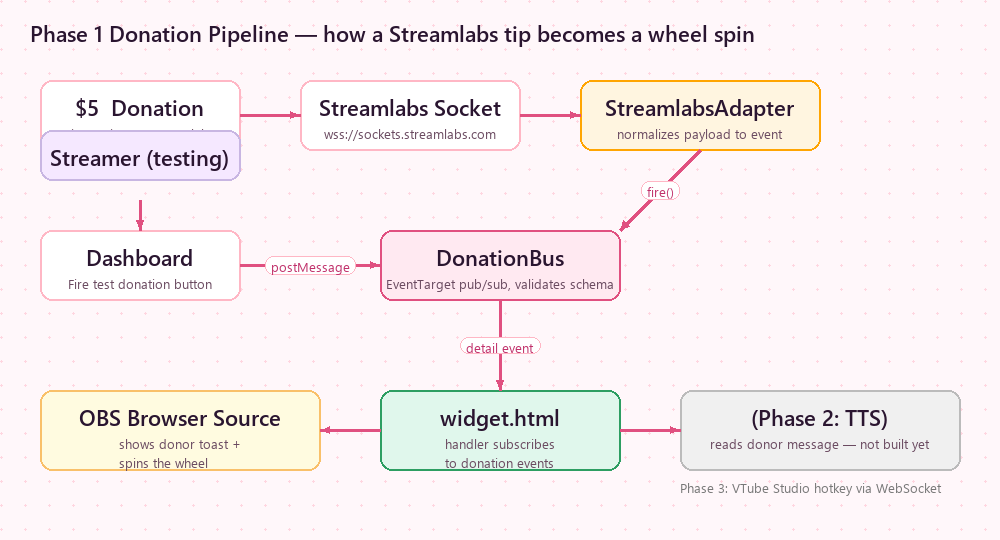
One donation. Three reactions, in parallel.
Every tip fires the same event — each subscriber listens and reacts independently. Mix any combination.
Auto-spin the wheel
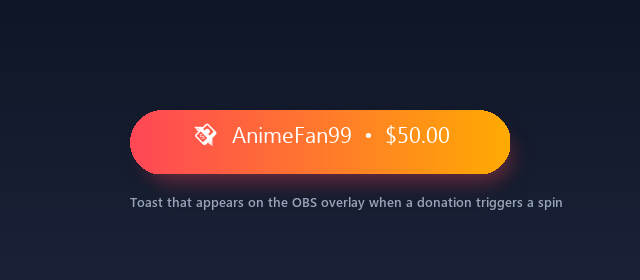
Donor & amount appear as a toast on the OBS overlay, then the wheel spins and lands on a winner. Works on the regular wheel or the gachapon-tier roll.
Read the name out loud
Web Speech TTS reads "Thanks DonorName, 5 dollars!" right on stream. Pick voice, rate, pitch — fully customizable template. OBS captures it on your audio output.
Trigger your VTuber model
VTube Studio hotkey fires based on rules — e.g. donate $50 → "epic dance", message contains "wave" → "wave hello". Local WebSocket, no cloud middle-man.
4-step setup
Total time: about 5 minutes. You'll need a saved wheel template and a Streamlabs account.
Open the streamer dashboard
Head to streamer.wheelofitem.com/dashboard and sign in with the same Google account you use on wheelofitem.com.
Pick a saved wheel or gachapon
Don't have one yet? Go build a wheel on the main page or set up a gachapon, then click Save as new. It'll show up in section 2 of the dashboard.
You can save multiple templates — different prizes per stream, different language wheels, etc. — and swap which one is "live" from the dashboard.
Connect your donation platform (Streamlabs / Gank)
In section 4 of the dashboard, pick the donation source:
- Streamlabs — listen to real tips in real time. Paste your Streamlabs socket token (get it at streamlabs.com/dashboard#/settings/api-settings → "Show socket token").
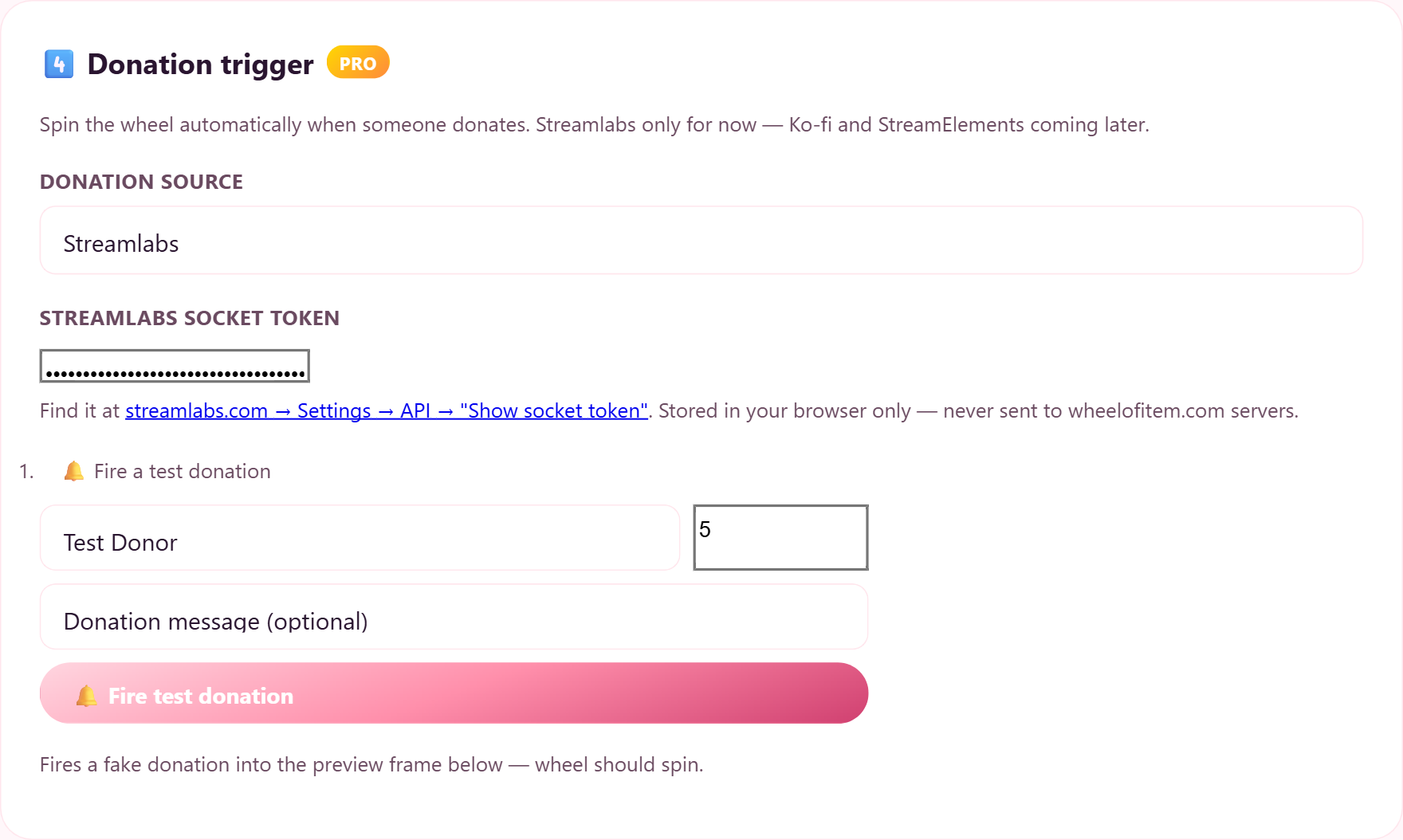
0 (default) for instant spin, or 10–15 if you want Streamlabs' normal donation alert (image + sound + donor name) to play first and the gachapon to take over after that. Max 60s.
Add the widget URL to OBS
In section 5 of the dashboard, hit Copy on the Browser Source URL. Then in OBS:
- Sources → + → Browser Source
- URL: paste the URL from the dashboard
- Width: 520 · Height: 520 (or whatever fits your layout)
- Click OK — the wheel should render transparent over your scene
Troubleshooting & FAQ
The short answer to the most common "why isn't this working?" questions.
Donation came in but the wheel didn't spin
- Check the URL in OBS — it must contain
?donation=streamlabs&sl_token=…. If not, regenerate it in dashboard section 5. - Open the URL in a regular browser with
&status=1appended. The status pill in the top-right should readstreamlabs connected(green). Red means a bad token — get a fresh socket token. - If you set
&min_amount=5, donations under $5 are filtered out on purpose. - If a previous spin is still animating (~9 sec), the next donation is skipped intentionally to avoid mid-spin chaos. Queue mode is on the Phase 4 roadmap.
Does this work with Streamlabs Desktop instead of OBS?
Does Ko-fi or StreamElements work?
Can I trigger the wheel from Twitch chat instead of donations?
!spin commands in your Twitch chat (mod-controlled by default). Both can run side-by-side.
What if I change my mind — can I cancel Pro?
Try our premium voices — for free
Pick any of 41 neural voices (incl. 6 Multilingual that speak Thai). Sign in once → unlimited free previews (200/hr limit).
Like what you hear? Upgrade to Pro ($3/mo) to use it on real donations + get 200 voice readouts per month.
Ready? Let viewers spin your wheel.
Sign in once, paste your Streamlabs socket token, drop the URL into OBS. Done.
Or build a gachapon first → Free stream schedule maker — make your weekly cover →Streamer Dashboard
📖 How-to guidePick a wheel, set up your widget URL, connect Twitch chat. Changes propagate to your stream in seconds.
Choose a wheel or gachapon saved
Wheels saved on wheelofitem.com. Click one to use it as your stream widget.
Pick this if you only want donation voice (TTS) and/or VTube Studio model reactions — no spinning wheel. The OBS overlay stays fully transparent and just plays the voice + triggers your model. (TTS and VTube Studio are Pro features.)
💡 How the Live toggle works: Click 🟢 Live on a card to let real donations trigger that template — or ⚪ Off to ignore them. Turn Off templates that aren't in your current OBS scene so they don't spin silently in the background and pollute your pull history. New saves default to Off — toggle them on before going live.
Donation trigger PRO
Spin the wheel automatically when someone donates — supports Streamlabs, Gank, Ko-fi, StreamElements, YouTube Super Chat and TikFinity. Tick whichever sources you use.
Tick every source you use — leave all unticked to turn donation triggers off. Fill in each ticked source's credentials in the boxes below.
Streamlabs socket token
Find it at streamlabs.com → Settings → API Settings → API Tokens → "Show Socket Token" (📷 see example).
💡 YouTube Super Chats trigger the wheel automatically through your Streamlabs or StreamElements connection when your YouTube channel is linked there — there's no separate YouTube token to enter.
In Ko-fi → More → API / Webhooks, paste this as your Webhook URL. When someone tips you on Ko-fi, the wheel spins. Then copy the Browser Source URL from section 6 below into OBS (safe to show — no secret in it).
In TikFinity → add a Trigger WebHook action, paste this URL, and set the JSON body to
{"coins":%coins%,"count":%repeatCount%,"nickname":"%nickname%","gift":"%giftName%","msgId":"%msgId%"}.
Set your minimum coin threshold in TikFinity's own trigger — a gift only fires the wheel if it passes that threshold. (Secret — don't show this URL on stream.)
Paste your Gank Stream URL (Gank → Stream Settings → Stream Alert). We read your Gank tips and spin the wheel / draw a card when one arrives.
Note: unofficial direct link to Gank — may need updating if Gank changes their system.
Find both in StreamElements → Account → Show secrets (Account ID + JWT Token). We connect to StreamElements and spin the wheel / draw a card when a tip arrives. ⚠ Treat the JWT token like a password — keep it off stream.
Donations below this amount are ignored — no spin, no draw. Applies to every template (wheel, gachapon, tarot). 0 = every donation triggers (default).
💱 Any incoming donation is auto-converted to this currency at daily FX rates before the minimum is checked — so a tip sent in another currency still counts fairly.
Wait N seconds after the donation arrives before the gachapon pops up and spins. Useful when you want Streamlabs' normal donation alert (image + sound + donor name) to finish playing first — then the gachapon takes over.
0 = spin immediately (default). Typical Streamlabs alert is ~7–15 seconds.
Max 60 seconds.
Your settings auto-save as you type. The button above forces an immediate save.
Voice (TTS) PRO
Read the donor's name + amount + message aloud on stream. Captured by OBS through your browser source's audio.
—
Placeholders: {donor} {amount} {currency} {message} {source}
Premium voice — Google Chirp 3 HD (natural multilingual)
Pick a language first, then a voice. Every Google Chirp 3 HD voice is multilingual — it reads ไทย / English / 日本語 / 한국어 / Español / Français / 中文. Premium voice readout is a Pro feature (200 donations/month). If the monthly cap is reached it automatically falls back to the free Google voice, so reads never go silent.
Resets at the start of each month
Uses the Template text above (with placeholders filled from a sample donor name + amount). Doesn't count toward your monthly quota.
Your widget token lives in our database, never in the URL of a public page. If you share your widget URL publicly, click to rotate the token and invalidate the old one.
VTube Studio PRO — optional
Make your VTuber avatar react when someone donates — your model plays an animation (a “hotkey”) automatically. You need the free VTube Studio app running on the same PC as OBS.
- In VTube Studio, switch the API on.
Open Settings (the gear icon) → find “Plugins / Start API” and turn it ON (it uses port 8001). Keep VTube Studio open. - Connect — you only do this once.
Click the button below. A small popup appears inside VTube Studio asking to allow “Wheel of Item” — click Allow. - Pick the animation to play on a donation.
Give your alert or voice a moment first. 0 = react instantly.
Best for a Toggle Expression hotkey — it re-fires the hotkey to turn the face/pose off. Leave 0 for animations (they end on their own). ✨ Cleanest: set “Auto-deactivate after N seconds” on the expression hotkey inside VTube Studio, then leave this 0.
🔒 Saved to your account — VTube Studio reconnects automatically each session, on any computer.
- Test it.
-
VTuber reacts to each prize — set an outfit/pose per wheel result (+ timing)Wheel prize → outfit changeEach prize can switch your VTuber’s outfit or pose. Set it up below ↓
Set up the per-prize table
Give each prize its own hotkey — when the wheel lands on it, that animation plays. Only prizes you map here react. Click Load my hotkeys above first.
What each column doesDelay s — how many seconds after the wheel stops before the pose plays (lets your alert/voice land first). 0 = instant.Off s — keep the pose on this many seconds, then turn it off automatically. 0 = stay on (until a new prize in the same group replaces it).Group A/B/C — put poses that can't be worn together in one group (e.g. all outfits = A). Only one per group stays on — winning a new one auto-turns-off the previous one in that group. (Works with Expressions.)🔒 Works with a wheel template — pick a wheel in step 2 to use this.PrizeHotkeyDelay sOff sGroup
Twitch — chat commands + channel points — optional
Only fill this in if you stream on Twitch and want viewers to !spin from chat or spend Channel Points / Bits. Skip it for a donation-only setup.
Lowercase username (no #, no URL). Used to read chat commands.
Who can use chat commands?
!spin and !remove are always mod-only. Broadcaster + mods can always use everything.
Display options
Channel Points + Bits (Twitch) PRO
Viewers spend Channel Points to !spin — the widget detects the Twitch custom-reward-id and authorizes the spin even from non-mods.
You can preview the setup below; spins from Channel Points / Bits will activate once your account is Pro.
Channel Points — any viewer can !spin when a Twitch Channel Points reward
is configured to send !spin to chat. The widget detects the custom-reward-id tag
and authorizes them. Setup guide →
When a viewer cheers Cheer100 !spin with this many bits or more, the wheel spins. Bits stay on the channel — you keep them.
Copy your URLs + live preview
Paste these into OBS / Streamlabs Browser Source. Widget endpoint stays on streamer.wheelofitem.com for bandwidth isolation.
⏳ Coming after the Wheel of Item Twitch Extension is approved by Twitch.
🎬 Live Control Pro
Fire the widget on your OBS overlay right now — no donation needed. Perfect for lucky draws or playing with chat. The result pops on stream in ~1s (the preview below spins too, silently).
Live preview
What your viewers will see — refreshes every time the URL changes.
Pick a wheel or gachapon in section
The live preview will appear here once you select what to spin. Then test from your platform below to see it in action.
Test your donation alert
Want to test Streamlabs's FULL pipeline (alert sound + their event format)? Open Streamlabs in a new tab — click their Test button there → the event reaches your widget here through the socket you already connected. Keep the tab open so you don't have to log in again next time.