 Wheel of
 Viewers tip. Your avatar reacts. Live.
A viewer drops a tip — and in the same second your wheel spins on the overlay, their name gets read out loud, and your VTube Studio model reacts to whatever the wheel landed on. Not a generic alert that plays the same sound every time: a different face, pose, or prop depending on the result. It's free, it's one OBS browser source, and your viewers don't install anything.
🎭 Set it up on the streamer dashboard →The loop, end to end
Everything hangs off a single event. When a tip arrives it gets normalized into one donation event, and each reaction subscribes to it independently — so you can run all three, or just the ones you want.
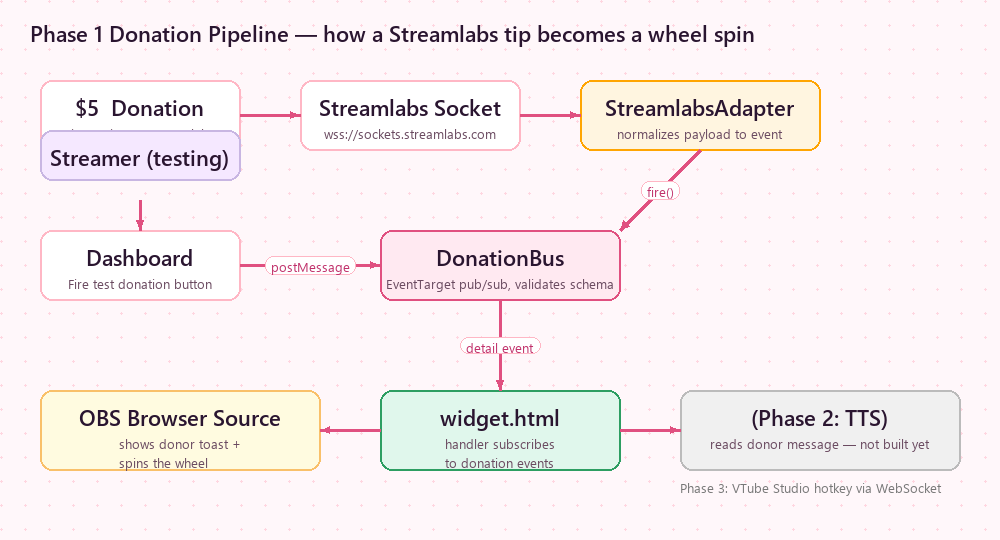
What a viewer actually sees
Say you put five outcomes on the wheel: Sing a line, Scary story, Chat picks my next game, Penalty face, Nothing, sorry. A viewer tips $5. On stream, a toast pops with their name, the wheel spins for a few seconds while chat spams guesses, and it lands on Penalty face. Your voice-over reads "Thanks Miku, 5 dollars!", and your model instantly pulls the shocked expression you mapped to that exact slice.
The moment is the product. Chat isn't watching a number go up — they're watching whether they get to make you do the thing.
Three ways to fire it
- A tip. Streamlabs, StreamElements, Ko-fi, Gank, TikTok gifts (TikFinity), YouTube Super Chats. Listen to one source or all at once, with a minimum amount so small tips don't spam it. (Pro)
- A chat command.
!spin,!add,!remove,!list— gate them to mods, subs, or everyone. Good for interaction nights when you'd rather not ask for money. (Pro) - Your own button. Fire it manually from the dashboard mid-stream when a moment calls for it — and your mapped VTube Studio reaction still plays. (Pro)
Pick the interaction you want
- VTube Studio wheel — the full per-prize hotkey setup, step by step. This is the one that makes the model react differently to each result.
- VTuber gachapon — a capsule machine instead of a wheel, with rarity tiers and a rare-drop moment that chat loses it over.
- Twitch donation wheel — the plain "every tip spins it" setup.
- Spin wheel in OBS — chat-driven with
!spin, no donations needed. - Streamer dashboard — where you connect the sources, pick voices, map hotkeys, and copy the browser-source URL.
What's free and what isn't
Every new account gets a 30-day Pro trial with no card — long enough to build the whole thing and run it on real streams before you pay anything. After that, the streamer side is Pro ($3/month, via Patreon): the dashboard where you connect a tip source, pick a voice, map your VTube Studio hotkeys and copy your OBS browser-source URL is Pro-only, and it covers donation-triggered spins, Twitch chat commands, text-to-speech, saved wheels and templates, extra themes and no ads. The tools on the main site — the wheel, the gachapon machine, tarot and the tier-list maker — stay free forever, no signup and no watermark.
Why not just use a normal random picker?
General pickers like Wheel of Names or PickerWheel are fine for drawing a name. They don't listen to your donations, they don't read the donor out loud, and they can't touch your Live2D model. If you're a VTuber, the whole point is that the outcome lands on you — on camera, in character, in real time. That's the layer this adds.
FAQ
How does a viewer actually trigger a reaction on my stream?
They tip through a platform you already use — Streamlabs, StreamElements, Ko-fi, a TikTok gift via TikFinity, or a YouTube Super Chat. Wheel of Item hears that tip and fires everything at once: the wheel or gachapon spins on your overlay, the donor is read out loud, and your VTube Studio model plays the hotkey mapped to whatever it landed on. Chat commands like !spin work too if you'd rather not involve money.
Do my viewers have to install anything?
No. They tip exactly the way they already do, or type a chat command. Everything runs on your side as one transparent OBS browser source — nothing for them to add, nothing to download.
Which tip platforms work with it?
Streamlabs, StreamElements, Ko-fi, Gank, TikTok gifts through TikFinity, and YouTube Super Chats via your Streamlabs or StreamElements connection. Listen to one or all of them, and set a minimum amount so tiny tips don't spam the overlay.
Can I use it if I'm a PNGTuber, or not a VTuber at all?
Yes — the VTube Studio part is optional. Without it you still get the donation-triggered wheel or gachapon plus the voice readout, which works for any streamer. The model reaction is just an extra layer for people running Live2D.
Can different wheel results cause different reactions?
Yes, and that's the part general pickers can't do. Every prize gets its own VTube Studio hotkey — shocked on a penalty, hyped on a bonus. Prizes you leave unmapped do nothing, so you decide exactly which outcomes get a reaction.
How much does it cost?
Every new account gets a 30-day Pro trial with no card, so you can build it and run it on a real stream before paying. After that the streamer side is Pro — $3/mo on Patreon — because the dashboard that holds the tip sources, the voice, the VTube Studio hotkey mapping and your OBS browser-source URL is Pro-only. The tools on the main site (wheel, gachapon, tarot, tier-list maker) stay free forever, no signup and no watermark.
Ready to let chat pull the lever?
Connect a tip source, build a wheel your chat will fight over, map a few reactions, and paste one URL into OBS. You can have it running before your next stream starts.
🎡 Open the streamer dashboard →Related
- VTube Studio wheel — per-prize model reactions, full setup.
- Guide: make your VTuber react to a wheel spin
- VTuber gachapon — capsule machine with rarity tiers.
- Try the gachapon machine
- Tier list maker — rank things live with chat.
- Pricing — what Pro actually unlocks.